Have you seen developers raving about Claude Code and wondered what it actually is?
You're not alone. Since launching in May 2025, it has become one of the most talked-about developer tools in the world — with a 46% “most loved” rating among developers in early 2026 surveys.
This guide explains what Claude Code is, how it works, how to start using it, and what it costs. In plain English, no jargon required.
What is Claude Code?
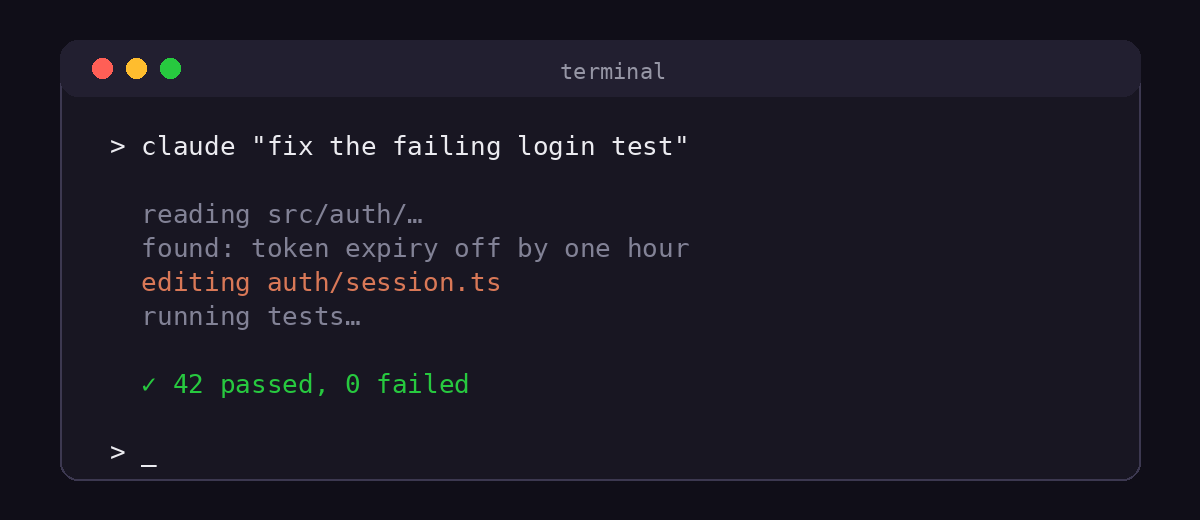
Claude Code is Anthropic's AI coding agent. It lives in your terminal — and now also in VS Code, JetBrains IDEs, a desktop app, and the web.
It is not autocomplete. You don't get line suggestions while you type.
Instead, you hand Claude Code a whole task in plain English. Something like “fix this failing test” or “add dark mode to the settings page.”
Then it goes to work: it reads your codebase, makes a plan, edits files, runs commands and tests, checks its own output, and keeps iterating until the task is done.
That's what makes it an agent rather than an assistant. Developers describe the shift simply: you stop typing most of the code, and start directing it.
How Claude Code works
Under the hood, Claude Code runs a loop.
Read. It explores your project the way a new team member would — opening files, following imports, understanding structure.
Plan. For non-trivial tasks it lays out steps before touching anything.
Act. It edits files and runs shell commands — builds, tests, linters — asking your permission for anything sensitive.
Verify. It reads the output of what it ran. Failing test? It reads the failure and fixes its own work.
The loop repeats until the task is complete. You review the diff at the end, like reviewing a pull request from a very fast colleague.
Getting started in five minutes
Setup is genuinely short. Install the CLI, open your project folder, and run one command:
npm install -g @anthropic-ai/claude-code — then type claude inside your project directory.
You'll be prompted to log in with your Claude account on first run.
A good first prompt is exploratory: “what does this project do?” Let it walk the codebase and explain it back to you.
Prefer an editor? The official VS Code extension gives you the same agent in a sidebar. The official Claude Code quickstart covers every install path.
🎮 Take a break — play the arcade game in your browser →Claude Code Buster · free · no install, no sign-up · heads up: this is a game, not a dev toolWhat developers actually use it for
The everyday wins are unglamorous and constant.
Debugging. Paste a stack trace, and it hunts the cause across files.
Tests. Point it at untested code and ask for coverage.
Refactors. Multi-file renames and migrations — the tedious work agents are best at.
Understanding code. Drop into an unfamiliar repository and ask questions before you change anything.
Teams go further: wiring it into CI, running several tasks in parallel, and letting it review pull requests before a human does.
CLAUDE.md: giving it a memory
Claude Code reads a file called CLAUDE.md at the root of your project, every session.
Teams put their conventions there. Which package manager to use. How to run tests. What patterns to avoid.
It works like onboarding notes for the agent — written once, obeyed every time. It's the single highest-leverage habit for getting consistent results.
Six tips for better results
1. Scope tasks small. “Fix the login redirect” beats “improve auth.”
2. Review every diff. It's fast, not infallible. You are the senior engineer in the loop.
3. Ask for tests first. A failing test gives the agent a target to satisfy.
4. Use CLAUDE.md. See above — it compounds.
5. Clear context between tasks. A fresh session avoids leftover assumptions.
6. Let it verify. Ask it to run the tests after changes rather than assuming.
Want the full walkthrough? Read our step-by-step guide to using Claude Code.
Pricing and availability
Claude Code is included with paid Claude plans and is also available through the Anthropic API, where usage is billed by tokens.
There's no separate purchase — if you have a Claude subscription that includes it, you're in.
Weighing alternatives? See how it stacks up in Claude Code vs GitHub Copilot.
Frequently asked questions
Is Claude Code free?
It requires a paid Claude plan or API access. (The arcade game named after it is free, though.)
Does Claude Code work with any language?
Yes — it operates on your files and shell, so anything you can build in a terminal, it can work on.
Is Claude Code a game?
No. Claude Code is a developer tool by Anthropic. Claude Code Buster is the unofficial parody arcade game it inspired — the orange buttons on this blog lead there.
Claude Code Buster is an independent, unofficial parody game. It is not affiliated with, endorsed by, or sponsored by Anthropic, OpenAI, GitHub, Microsoft, Google, Meta or xAI. All trademarks belong to their respective owners and are used descriptively.